Explain a position once. Every student watches it.
Mislisha is a workplace for chess trainers. Play a line on the board, write a sentence about each position and draw the arrows: the app makes a narrated video you can send to any student. Then meet them live on one board, set homework, and see what each of them actually did.
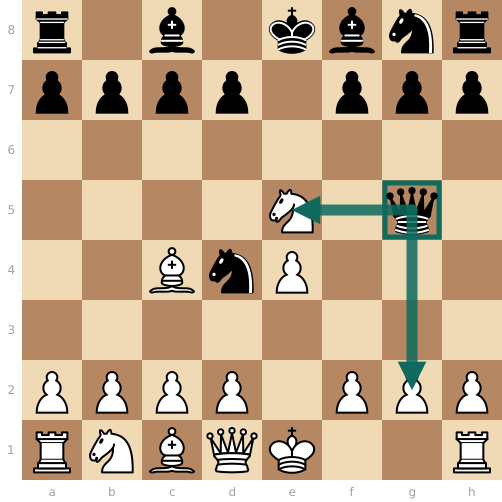
“Now the queen attacks the pawn on g2 and the knight on e5 at once.”
A trainer's week in the app
Everything a student is sent comes from what you prepared, and everything they do comes back to you.
-
Prepare
Your own board with the engine and the opening explorer. Diagrams from a chess book in PDF become positions and exercises.
In the app: Teach › Preparation, Scan a book -
Send
A tutorial as a video, homework with exercises and puzzles, to one student or a whole group, with a due date.
In the app: Teach › Homework -
Meet
A live session: one board and voice. You lead; the student answers on the board.
In the app: Teach › New session -
See
Which puzzles each student solved at the first try, which exercises they missed, and a report a parent can read without an account.
In the app: Teach › Students
Between sessions, your students practise on their own
The same app, on their side. You see the results.
- Tactics at their ratingPuzzles matched to their rating, with progress you can see.
- Their own games, reviewedMistakes marked move by move, and drilled later.
- Endgames from real gamesPlayed out against the tablebase.
- An opening repertoireBuilt move by move on the board, then drilled.
What it keeps, and what it does not
A live session is never recorded with sound. The engine runs on your own computer or phone. A student under 18 is connected to you only after a parent confirms it, by a link sent to the parent.
Documents
The Serbian versions are the legally binding ones.